
Understanding Surveillance Footage
How Video Surveillance Systems Operate
Security camera video is often treated as infallible evidence until it turns into a pixelated mess. To understand what you are looking at, you need to know how the system works. A camera captures light through a lens, then an image sensor converts that light into an electrical signal. An encoder compresses the signal to save storage space. The resulting data travels via network cables or Wi-Fi to a digital video recorder. That recorder stores the footage for later playback.
Consider the common configurations:
- Analog systems using coaxial cables, which are inexpensive but lower resolution.
- IP cameras transmitting over Ethernet, offering higher detail and flexibility.
- Hybrid setups that mix old and new equipment for cost-effective upgrades.
Each configuration changes the quality and reliability of your security camera video. Compression settings affect clarity, while bandwidth limits determine whether you get smooth motion or choppy frames. This chain explains why some security camera video looks pristine while other footage deteriorates at the moment of truth.
Primary Types of Camera Hardware
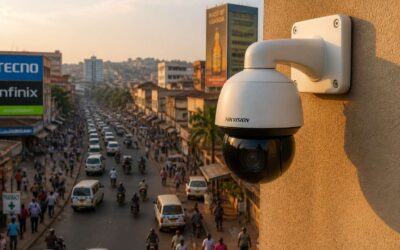
Walk into any electronics store and you will see camera housings that look vaguely threatening. The real differences hide inside those shells! Dome cameras sit flush against ceilings, making them hard to aim and harder to clean, yet they dominate retail spaces because they deter tampering. Bullet cameras are the long-nosed option, easier to position but obvious enough to invite mischief.
Hardware choices include:
- Dome cameras for indoor, ceiling-mounted coverage
- Bullet cameras for fixed outdoor sightlines
- PTZ cameras that move and zoom on demand
Each type shapes the security camera video you retrieve. A grubby dome lens produces a smeared image that ruins facial identification. A bullet camera’s narrow field of view captures less context, while a PTZ operator who pans too fast leaves you with motion blur. I can usually predict what your security camera video will look like from the hardware alone.
Essential Video Quality Metrics
Resolution is the headline metric, but it is not the whole story. A 4K sensor sounds impressive on the box, but if the encoder crushes the bitrate, the sharpness vanishes into macroblocking. Your security camera video feed is only as clear as the compression allows. Frame rate also matters. Fifteen frames per second might catch a loiterer, but a fast-moving vehicle becomes a smear across the pavement.
Common pixel counts you will encounter:
– 1080p for general coverage
– 4K for licence plates or facial detail
– 5MP for wide area balance
Bitrate is the quiet workhorse. Lower settings stretch storage but hurt clarity. High dynamic range helps when a suspect stands with the sun behind them. Every metric trades against another. You cannot have flawless night vision, smooth motion, and massive storage without spending serious money. Know your priorities before you review a single clip. A crisp image of an empty street is a waste of data. The pixel dimensions matter only when they capture something you actually need to identify.
Common Applications and Benefits
Every security camera video is a silent witness that never blinks. The interpretation happens later, in a quiet office, when you trace a suspect’s path through a parking lot or verify the exact second a gate chime went unanswered. In South Africa, where urban density and remote sites create gaps in human oversight, this footage becomes an essential factual record.
Common applications include operational needs:
- Confirming delivery times at loading docks
- Documenting damage disputes with tenants
- Mapping foot traffic for store layout decisions
The benefits accumulate quietly. You replace guesswork with verified chronology!
Optimizing Recording Settings for Clarity
Resolution and Frame Rate Selection
The difference between a blurry shadow and an identifiable suspect comes down to two recording settings. In my years reviewing security camera video, I’ve seen 4K footage ruined by a 5 fps frame rate, while a 720p stream at 25 fps captured the crucial moment.
Resolution determines how many pixels form each image. Frame rate dictates how many images you store per second. Together, they define your storage budget and your ability to recognize a face across a parking lot.
- Perimeters use 1080p at 10 fps to track movement without flooding your drive.
- Till points use 4K at 20 fps to capture quick hand movements.
- Low power sites use 720p at 5 fps to stretch recording capacity over days.
The right balance varies with your site’s light, distance, and storage. Clarity in security camera video comes from matching frame rate to motion speed, not from always picking the highest numbers.
Lighting Considerations and Night Vision
Most thefts on South African properties happen after dark. That single fact makes lighting more important than lens quality. A camera facing direct sunlight produces a washed-out image. The same camera facing a dark driveway at midnight produces nothing but noise. In my years reviewing security camera video, exposure control identifies more suspects than megapixels ever will.
Backlighting is the enemy. When bright light sits behind a person, their features collapse into a silhouette. Use wide dynamic range (WDR) to balance shadows and highlights. For night vision, infrared (IR) illumination exposes what the human eye cannot see. Beware of reflection off walls and dust, which causes whiteout.
Common clarity killers:
- Light flares from rain and fog
- IR bloom on close-range subjects
- Cameras aimed into streetlights
Security camera video only becomes evidence if you can identify a face. Match your exposure to the scene. Don’t trust factory defaults!
Field of View and Camera Positioning
Recording settings matter more than hardware, in my opinion. A camera with perfect optics produces poor security camera video if the encoder crushes detail. Bitrate starvation causes blockiness on moving subjects, while excessive sharpening creates halos around edges. Match the bitrate to the scene’s complexity. A static corridor needs less bandwidth than a parking lot with constant motion.
The field of view should serve the purpose, not the specification. Wide angles capture more area but shrink faces to unidentifiable specks. For identification, prioritize coverage of entry points rather than sweeping the entire property. Position cameras:
– At a height of 2.5 to 3 metres, which allows a downward angle without losing facial detail
– Away from direct glare and reflective surfaces
– With a clear line of sight to the subject’s face, not the back of their head
Choke points create the best footage. A gate, a sliding door, or a narrow passage forces movement into a predictable path. This constraint simplifies positioning and guarantees that the subject faces the lens at some point. I have reviewed many incidents where the suspect’s face appears for a few frames, and that was enough. The difference between identifying a suspect and staring at a blur often comes down to deliberate placement, not expensive equipment. Proper settings turn that blur into security camera video that actually holds value.
Compression Methods and Bitrate
Almost 30% of security camera video requests that law enforcement receive are unusable due to poor compression settings. That is a staggering figure when you consider the cost of physical security infrastructure. The encoder is the brain of the operation, and if it is starved for data, the resulting footage becomes a mosaic of pixels that lacks evidentiary value.
Every scene has a baseline threshold for clarity. A quiet residential driveway in Pretoria requires less data than a busy loading dock in Durban. The constant motion of vehicles and pedestrians scrambles the encoder’s predictive algorithms. You must allocate a higher bitrate to accommodate that chaos. When the bitrate falls below the scene’s requirement, you lose the facial details that matter most.
Modern cameras offer a choice between H.264 and H.265 compression. The latter is more efficient, but it demands more processing power from the recorder. The trade-off is real: 4K security camera video streamed with H.265 retains sharpness at roughly half the bitrate of its predecessor. This efficiency allows you to store more days of footage without sacrificing spatial resolution. However, do not assume that lower is always better. A variable bitrate setting can cause fluctuations in quality during sudden movements, while a constant bitrate maintains a stable file size but may waste storage on static scenes.
Compression methods also affect the structure of the file itself. Keyframes, or I-frames, anchor the video stream. If they occur too infrequently, playback scrubbing becomes choppy and unreliable. Set your keyframe interval to match your frame rate. This ensures that every second of footage has a complete reference point. The result is security camera video that remains coherent during rapid action sequences, giving investigators a clear path to identification.
Leveraging Motion Detection Features
An audit of 200 South African retail sites found that 40% of security camera video clips lacked the clarity needed to identify suspects. The problem was recording settings, not hardware.
Optimizing recording settings for clarity requires a per camera approach. I have seen too many sites leave shutter speed on auto. A fast shutter freezes motion but reduces light reaching the sensor. Exposure compensation balances that trade off.
Leveraging motion detection features reduces storage strain while preserving evidentiary value. The parameters that matter most are detection zones, sensitivity thresholds, and pre roll recording.
- Detection zones ignore road traffic and swaying trees
- Sensitivity thresholds match foot traffic density
- Pre roll recording captures several seconds before the trigger
Security camera video becomes searchable when motion events are catalogued properly. Investigators can skip hours of static footage and jump directly to relevant events.
Storing and Managing Recorded Footage
Local Storage Solutions and Capacity
In a country with high crime statistics, recorded security camera video is not a luxury. It is the only irrefutable witness you will ever have. Every hour of footage you capture demands a storage solution that is just as ruthless as your surveillance goals.
Local storage remains the stalwart choice for its sheer control. Network Video Recorders (NVRs) and Digital Video Recorders (DVRs) offer physical custody over your data, shielding it from the vulnerabilities of internet dependency. However, capacity planning requires a brutal calculation. The resolution, frames per second, and compression settings we previously discussed dictate the appetite of your hard drive. A 4K stream can consume over 10 gigabytes per day. Multiply that by the number of cameras and retention days, and the numbers quickly become sobering.
Planning for storage capacity involves a few critical variables:
– Hard disk drive space (terabytes)
– The duration of continuous versus event-based recording
– The bitrate output from your camera settings
– Expected redundancy for system failures
In South Africa, load shedding introduces another layer of complexity. Uninterrupted power supply (UPS) systems are not for the cameras alone, they are vital for the integrity of the recording device. A sudden power loss can corrupt files or halt writes, leaving you with a blank screen at the moment you need the truth most. The choice between a standard HDD and a surveillance-specific drive is another test of resilience. Standard drives lack the continuous write tolerance required for 24/7 operations, often failing under the relentless pressure. Investing in drives rated for constant recording is non-negotiable for a dependable system. The fragile nature of these moments demands that your data remains untainted, waiting for the eyes that will eventually judge its content. Remember that the cost of your storage is the price you pay for the certainty of what actually happened.
Cloud Storage and Subscription Plans
Cloud storage shifts the burden from physical custody to remote redundancy. I have seen South African property owners hesitate, yet the cost of losing a critical clip to a stolen hard drive is far higher. Subscription plans tier your security camera video across retention periods, resolution access, and simultaneous viewing allowances. A provider must respect the Protection of Personal Information Act.
Bandwidth constraints often throttle uploads; a 4K stream on a struggling fibre line will stutter. Consider these factors when comparing cloud services:
- Encryption during transit and at rest
- Local backup export options
- Monthly upload caps or fair usage policies
The cloud excels at preserving evidence beyond reach, but it requires disciplined network management. That alone is worth the monthly fee!
Establishing Video Retention Policies
Nothing stirs the soul quite like discovering that the critical moment of a break-in was overwritten three days ago because your retention policy was, to put it diplomatically, a hopeful wish. The most sophisticated camera array on the Highveld is merely ornamental if the recorded footage evaporates before you need it. A proper retention schedule is not an afterthought. It is the difference between a useful security camera video archive and a very expensive collection of blank space.
Retention policies require a frank conversation with your own risk tolerance. A residential property in Johannesburg might find a seven day cycle perfectly adequate, preserving the full week for review while avoiding the slow crawl of storage degradation. A retail operation in Durban, however, will likely need a month of history to settle supplier disputes, customer complaints, and the occasional, very creative employee excuse for a missing stock item. The length of time you keep security camera video should mirror the realistic timeline of an incident being noticed and reported, which is often longer than you expect.
Legal obligations in South Africa also factor into the equation. The Protection of Personal Information Act does not care about your nostalgia for old footage. It demands that you retain personal information only for as long as is necessary to fulfill the purpose for which it was collected. Holding onto security camera video for six months “just in case” is a compliance violation waiting for a mild Tuesday afternoon. Your policy should be documented, defensible, and strictly enforced, ideally with a system that purges old files automatically.
The capacity decisions are brutally practical:
-
Higher resolution and frame rates consume storage at a startling pace, so a policy must budget for the bitrate of your chosen compression standard.
-
Motion detection recording extends retention windows compared to continuous recording, assuming the detection is configured with any semblance of accuracy and not just reacting to every shadow and passing cat.
-
Archive rotation, where older security camera video is overwritten systematically, is cheaper than perpetual expansion, but it permanently sacrifices the chance to revisit a forgotten event.
An effective policy also separates the wheat from the chaff. Event based clips, triggered by an alarm or a sensor, deserve a longer shelf life than the ambient hum of a quiet corridor. You might keep critical incident footage for 30 days while routine security camera video lasts a week. This tiered approach respects both your budget and your common sense. The goal is to have the footage when you need it, not to hoard terabytes of yesterday’s empty parking lot.
Ultimately, the archive is a promise to your future self that you will have the answer. Set the policy, configure the system, and let it run. The cost of a few high capacity drives is trivial compared to the cost of explaining to a client or an insurer that the evidence was, regrettably, deleted by a schedule you never set. Your security camera video is only as good as the discipline behind keeping it.
Organizing and Searching Recorded Clips
Storing footage is one thing. Finding the specific moment you need within that footage is an entirely different labour. Many security camera video systems are configured, then left to record into a digital abyss. The files exist, but are practically inaccessible due to poor naming conventions and chaotic folder structures. You become a digital archaeologist, sifting through layers of timestamps just to answer a simple question about a Tuesday afternoon.
Organizing security camera video demands a deliberate hierarchy. Begin with camera location as the primary folder division, then date, then a logical time block. Consistent naming is not a stylistic preference; it is a survival mechanism. Include the camera name and a recognizable event label in the filename. The effort spent on metadata saves hours of frantic searching later. When your system tags clips based on motion type or a specific zone, you can bypass entire days of footage and jump directly to the anomaly.
Search functionality is where most systems reveal their truth. A timeline scrubber is only useful if you know the approximate time of the incident. For a targeted hunt, filter by date range and then by the specific camera. Also, treat your storage layout like a library index. Do not hide old files in a labyrinth of nested folders that require a treasure map to navigate.
– Time of day
– Camera zone or field of view
– Event classification, such as person, vehicle, or loitering
The real payoff arrives when you can pull the exact sequence without watching hours of ambient silence. The search experience defines the value of the entire setup. If you cannot retrieve it in under two minutes, the security camera video might as well be static. This is the quiet labour that separates a genuine asset from a passive collection of ones and zeros. An organized archive respects the time of the person who needs the answer. If they have to fight the interface, they will abandon the investigation. A system that makes the past available on demand is a system that actually works for you.
Backup Strategies and Redundancy
The archive of forgotten footage is littered with single-drive systems that never survived the night. A security camera video collection exists only when a second copy confirms it. In South Africa, load shedding makes abrupt shutdowns a recurring threat; each power cut risks corrupting the only record of an incident.
Redundancy means anticipating failure. Keep a mirrored drive on the premises and an offsite repository, because a thief who steals the recorder steals the evidence. Core layers to consider:
- A secondary NVR or NAS in a locked cabinet
- Encrypted cloud backup for critical clips
- Weekly integrity checks on both copies
The price of a second disk is trivial beside the cost of a lost case. Treat redundancy as the spine of any security camera video deployment; when the primary storage dies, the past should still be retrievable.
Analyzing Video for Security Insights
Real-Time Monitoring Techniques
An hour of stored footage is just a sleeping file; the real story is told in its moments of alert. Real-time monitoring transforms passive recording into a decisive action, providing a live vantage point that transcends the limitations of a simple timeline. Operators can observe the spatial dynamics as they happen, watching for anomalous movements that might indicate a threat to personnel or property, particularly crucial in high risk environments.
This active engagement requires a specific set of methods to be effective. The process is less about watching and more about interpreting the data stream. To derive a clear picture from the visual noise, operations typically rely on these techniques:
1. Active Camera Cycling: Sequential switching of feeds on a monitor bank to cover larger areas with a limited number of viewers.
2. Behavioral Baseline Analysis: Using observed patterns to flag deviations, such as an individual loitering near a restricted access point for an unusual duration.
3. Integrated Alert Triage: Prioritizing alarms from motion sensors or analytics to separate false positives from genuine incidents.
The goal is to shorten the response interval between an event occurring and an operative acknowledging it. A well calibrated monitoring station becomes a dynamic hub where the security camera video feeds are not merely displayed, but analyzed for intent and risk. This interpretation of live flow provides a serious benefit over merely reviewing footage after the fact, allowing for proactive management of safety protocols.
Forensic Review of Historied Footage
Forensic review is where your security camera video turns from a passive observer into a silent witness with a remarkable memory. When an incident slips past the real time operators, the archived footage becomes the only unbiased account of what truly happened. It is a form of detective work that requires patience and a systematic approach to separating fact from perception.
This analysis is not about watching hours of footage in real time. It involves a deliberate process of extraction and correlation. For instance, an investigator might be looking for the origin of a discrepancy in inventory, not a dramatic break in. The process often includes:
– Auditing the access patterns of specific personnel against their stated schedules.
– Cross-referencing timestamps from multiple camera angles to establish a precise timeline of movement.
– Pulling long term trend data to identify if an event was an isolated lapse or a developing pattern.
The real power of this forensic review lies in its ability to answer the “how” and “why” of an event. A casual glance at a doorway might miss the subtle shift in weight that preceded a shove, or the transient flicker of a shadow that indicates a third party’s presence. By analyzing the sequence frame by frame, one can witness the intent behind an action, not just the action itself. This transforms a simple record into hard evidence for an investigation or a legal proceeding.
We once traced a phantom discrepancy in a warehouse to a staff member who consistently walked out with a slightly thicker jacket on Fridays. The security camera video revealed nothing overtly criminal, but the accumulated data of that recurring posture was the clue. It is that kind of granular detail, hidden in plain sight, that makes forensic review an indispensable and compelling piece of the security puzzle. It is the difference between seeing an event and understanding its cause.
Implementing AI-Powered Video Analytics
Every hour of recorded surveillance hides patterns the human eye will never catch. AI powered video analytics changes that by turning security camera video into a proactive source of intelligence. Instead of reviewing after the fact, the system learns what is normal.
For example, it can identify a person loitering near a loading dock for 20 minutes. It can flag a vehicle circling the block three times. It can detect a sudden crowd formation where none existed. This is not about motion triggers. It is about behavioural context.
The value for South African businesses lies in real time anomaly detection. One facility manager told me the system alerted him to a gate opening sequence that repeated every Tuesday, a pattern no operator had noticed. The security camera video had always contained the evidence. AI simply made it readable. What a shift in perspective!
Incident Response and Evidence Handling
The moment an alarm sounds, the control room shifts. Operators pull up the relevant feeds and assess the scene in seconds. Security camera video often provides the first clear picture of what is unfolding, allowing a measured response instead of guesswork.
For incident response, clarity matters. Teams need to know who is involved, where they are moving, and whether weapons are visible. The footage guides the deployment of guards or the decision to involve the SAPS.
Evidence handling demands a different discipline. Once the incident ends, the recording becomes a legal artefact. Exporting the original clip immediately, logging every access, and storing the file separately from the main system protect the chain of custody. South African courts expect this level of care. Without it, the best security camera video can be ruled inadmissible.
Legal and Privacy Considerations
Compliance with Privacy Regulations
A single camera can capture more personal data in an hour than a filing cabinet holds in a year. When that footage involves identifiable individuals, your security camera video becomes a legal responsibility, not just a technical asset. South African courts have grown increasingly attentive to how organizations handle such evidence.
Compliance with privacy regulations demands more than a consent sign at the entrance. You must consider data minimization, access control, and retention periods. For example:
- Limit recording zones to areas where surveillance is genuinely necessary.
- Restrict who can view or export footage.
- Document every deletion or sharing decision.
The Protection of Personal Information Act sets clear boundaries. Your security camera video should respect the principle of purpose specification, meaning you cannot use collected footage for unrelated objectives. Regular audits of your surveillance practices will keep you aligned with evolving expectations.
Data Protection and Restricted Access
Your security camera video is only as protected as the access barrier surrounding it. Restricted access is a discipline, not a formality. Every individual who can view, export, or delete footage represents a potential vulnerability. South African organisations must enforce role based permissions, ensuring that only authorised personnel ever touch the recordings.
A layered approach safeguards both the footage and the organisation itself.
- Require multi factor authentication for all remote viewing sessions.
- Maintain an audit trail of every access event, no matter how minor.
- Encrypt footage both at rest and during transmission.
- Define clear consequences for unauthorised access attempts.
Data protection extends beyond the camera housing. The storage environment, whether local or cloud based, demands the same scrutiny. Regular reviews of user permissions and access logs will reveal anomalies before they escalate. Your security camera video should remain a tool for protection, never a source of exposure.
Signage and Notification Requirements
South African property owners often underestimate the power of a simple sign. Public perception of surveillance hinges on transparency. When people know they are being recorded, the security camera video captures more than just activity; it captures consent.
The Protection of Personal Information Act (POPIA) requires that individuals be informed of data collection. Signage must be clear, visible, and unambiguous. The wording should state that surveillance is in operation and who controls the footage. Vague notices create suspicion and undermine the protective intent.
Notification goes beyond a printed notice.
- Place signs at all entry points and boundaries.
- Use high contrast text that is legible from a distance.
- Include contact details for the responsible party.
These practical steps fortify the legal standing of your entire operation. When disputes arise, a well documented notification process can be the difference between accepted practice and an invasion of privacy claim. Your security camera video system should be an asset, not a legal liability. The sign is the first line of that defence.
Admissibility of Video in Legal Proceedings
A courtroom is a harsh critic of security camera video. In South African legal proceedings, footage must prove it hasn’t been doctored. Judges demand authenticity, not pixel perfection. The chain of custody matters more than your lens brand.
Your security camera video must be relevant and clearly time stamped. Any gap in handling could render it inadmissible. Privacy rights also apply, so capturing private spaces complicates matters.
- Preserve original files without edits.
- Document who accessed the footage.
- Maintain unbroken storage logs.
Courts treat video as evidence, not entertainment. If you can’t vouch for its handling, expect skepticism.

0 Comments